Crafting an image prompt is less “magic words” and more like choreography. You’re directing a model’s attention—shape, lighting, composition, style, and constraints—until the output lands where you meant it.
The Mental Model: What Your Prompt Actually Controls
Most AI image generators respond to prompt signals in two ways: semantic intent (what it should depict) and visual priors (how it should render it). Your job is to supply both—then remove ambiguity.
The Prompt Stack (Use This Order)
Start broad, then get precise. You’ll write faster, and your results will tighten.
A Fill-in-the-Blank Template You Can Reuse
Copy this, then swap the bracketed parts.
[Subject]: [what it is], [exact traits]
[Scene]: [environment], [time/place context]
[Composition]: [camera angle], [framing], [lens cue]
[Lighting]: [light direction], [quality], [mood], [background separation if needed]
[Style]: [photography/illustration style], [era], [texture/finish], [color palette]
[Quality/Details]: ultra-detailed, sharp focus, realistic materials (or: painterly, soft edges)
[Constraints]: no text, no watermark, no extra objects, avoid blur/distortion
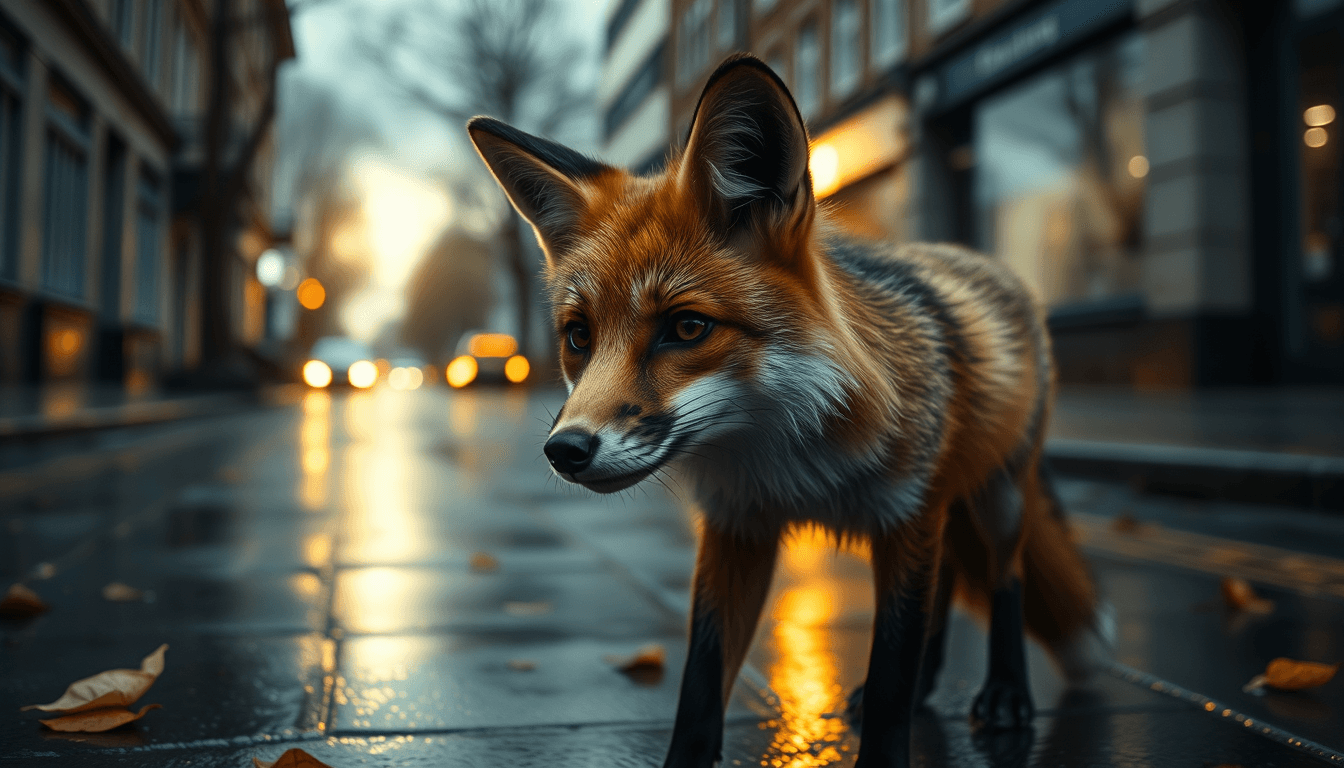
[Subject]: lone urban fox, sleek fur, alert eyes, slightly wet coat, subtle scar over left eye
[Scene]: empty London street after rain, reflective pavement, scattered leaves, early morning just before sunrise
[Composition]: low angle close-up, subject slightly off-centre (rule of thirds), shallow depth of field, 85mm lens look
[Lighting]: soft golden rim light from rising sun behind subject, diffused ambient light from overcast sky, cinematic contrast, strong subject-background separation
[Style]: cinematic photography, modern film still, subtle Kodak Portra tone, natural grain, muted urban palette with warm highlights
[Quality/Details]: ultra-detailed fur texture, sharp focus on eyes, realistic wet surfaces, micro-reflections in pavement, atmospheric depth with light haze
[Constraints]: no text, no watermark, no extra animals or people, avoid motion blur, avoid distortion, no exaggerated colours
Subject: Specify the “What,” Not the “Vibe”
Bad: “beautiful woman portrait”
Better: “a woman in her 30s, medium-length wavy auburn hair, green eyes, wearing a tailored charcoal blazer”
Prefer concrete physical descriptors:
- Age range, ethnicity cues (only if necessary)
- Distinguishing features
- Clothing/materials
- Props (and how many)
Scene & Context: Give the Model a Stage
The scene is where consistency comes from. Add:
- Location type (studio / street / interior)
- Background elements (bookshelves, architecture, horizon)
- Weather or atmosphere (fog, dust, rain sheen)
Composition: Tell It How to Frame the Image
Composition instructions steer the geometry:
- Camera angle: eye-level, low-angle, overhead
- Framing: close-up, medium shot, wide shot
- Lens cues: 35mm, 50mm, macro, telephoto (if supported)
- Depth: shallow depth of field, bokeh, foreground interest
Example snippet:
- “three-quarter view, 50mm lens look, shallow depth of field, subject centered with negative space”
Lighting: The Fastest Way to Improve Believability
Lighting is one of the strongest predictors of “this looks real.”
Try this structure:
- Direction: Rembrandt lighting / side-lit / backlit / rim light
- Quality: softbox diffused / hard sunlight / overcast
- Color temperature: warm golden hour / cool blue hour
- Mood: high contrast / low contrast / gentle falloff
Example snippet:
- “warm golden hour sunlight, low-angle light from camera-left, soft shadows, subtle rim light separating subject from background”
Style: Use Style as a Tool, Not a Decoration
Style instructions should be specific:
- Medium: “editorial photography,” “oil painting,” “vector illustration”
- Texture/finish: “film grain,” “painterly brush texture,” “clean flat colors”
- Reference vibe: “cinematic, noir, high-end fashion editorial”
Constraints: The Quiet Power Feature
Constraints prevent common failures:
- “no text, no logo, no watermark”
- “no extra limbs”
- “hands correctly formed”
- “single subject only”
- “background fully visible, no cropping”
If your generator supports negative prompts, mirror the constraints there too.
Quality Cues (Use Sparingly)
Add a final line that tells the model what “good” looks like:
- “high detail, sharp focus”
- “realistic materials”
- “natural skin texture”
- “clean linework”
- “balanced composition, coherent colors”
Avoid stacking five “perfect, beautiful, stunning, masterpiece” adjectives. One or two quality cues are enough.
A Few High-Performing Prompt Patterns
Pattern 1: The Cinematic Portrait
“subject + 3/4 angle + rim light + editorial lens + film grain”
Pattern 2: Product/Still Life
“isolated on neutral background + studio lighting + crisp reflections + real material texture”
Pattern 3: Concept Art Scene
“clear environment + camera perspective + atmospheric effects + consistent palette + defined focal point”
Debugging: When the Output Misses the Mark
Use a short loop. Change one variable at a time, then observe.
Your Next Iteration (Quick Exercise)
Try writing three prompts with the same subject, but change one layer each time.
Choose one subject you want to generate.
Write: 1) Prompt A: same subject + different composition 2) Prompt B: same subject + different lighting 3) Prompt C: same subject + different style Which layer created the biggest improvement?
Practical Takeaway Checklist
If this resonates, see how to apply it to your own work with the interactive Dispatch agent.
Be first to like this dispatch